InvoiceTemple: Invoice billing
- 4.8
- Rating
- 100.00K
- Installs
- Free
- Price

 Analysis by App-foxy
If you run a small business and need to send a professional-looking bill without building a complicated accounting system, InvoiceTemple: Invoice billing is the kind of app I would try first. It focuses on the practical documents many independent workers need every week: invoices, estimates, and receipts. That narrow purpose is its biggest strength. You are not pushed into learning a full finance platform before you can charge a customer.
I reviewed it as a business app from Digitkode Apps, and my overall impression is straightforward: it is best for freelancers, tradespeople, consultants, home-service providers, and very small teams that want a mobile way to prepare customer documents. It is free to install, rated for Everyone, and has built a solid audience with an average rating of 4.8 from around 7,200 ratings. That level of adoption makes it easier to see why the app appeals to people who want a quick alternative to handwritten paperwork or a general notes app.
What to expect before you begin
The first thing to understand is that this is not trying to replace a full bookkeeping package. I would not choose it as the central system for a company that needs payroll, inventory control, advanced tax reporting, bank reconciliation, or detailed financial forecasting. Its role is much more focused: help you create a document that explains what you are charging, then give you a usable record for the customer.
You May Also Like

 Blood Strike: 2.5 Anniversary
Blood Strike’s Loadouts Turn Every Drop Into a Tactical Gamble
A close look at Blood Strike’s custom loadouts: how fast access to signature weapons reshapes its battle royale rhythm, rewards preparation, and narrows the gap between fights.

 Pandora - Music & Podcasts
Pandora’s Music Is Easy to Start, but Harder to Recover
Pandora’s strength is its low-effort path from a seed to a station. Its weak spot is how much confidence it asks you to place in connection, setup, and quiet recovery.

 8 Ball Pool
8 Ball Pool Is Built on Rivalries, Rematches, and Routine
A close look at the rivalries, rematches, shared routines, and unanswered safety questions that turn a quick pool match into a persistent mobile community.

 Samsung Music
Samsung Music’s Quiet Strength Is Playing What You Already Own
Its reach comes less from spectacle than from dependable access to a personal library. That simplicity is both the app’s strongest retention engine and its ceiling.

 AccuWeather: Weather Radar
AccuWeather Review: A Quick, Clear Forecast for Everyday Decisions
For everyday plans, the best forecast is the one you can understand quickly. AccuWeather makes rain timing, radar, and local conditions easy to act on, with a few trade-offs.

 Hill Climb Racing
Why Hill Climb Racing Still Turns Crashes Into One More Run
A tiny car, a bumpy hill and one more upgrade: Hill Climb Racing keeps resurfacing because its simple chaos makes every near-miss feel personal.
More From Our News Desk



That focus makes the app less intimidating than many larger business tools. When I think about the usual alternatives, there are three common choices. A spreadsheet gives you flexibility but requires you to design and maintain your own templates. A word processor can produce a nice-looking document, but it is easy to forget invoice numbers, totals, or consistent customer details. A full accounting service offers much more automation, but it can feel excessive when you only need to prepare a few invoices each month.
InvoiceTemple sits between those options. It gives the task a business-specific structure without asking a small operator to adopt an entire accounting workflow. The store summary describes its purpose clearly, and in practical use that simplicity is important: the app makes more sense when you treat it as a document-making tool rather than as a complete financial command center.
It supports Android devices running at least version 7.0, so compatibility is broad for people using older phones. The current version is 15.0, and the app has passed the early experimental stage; it has been available since April 25, 2018. I still recommend thinking about your own workflow before installing it. If you need a polished invoice quickly and do not want to manage a larger system, it is a sensible candidate. If you expect automatic business administration, you may outgrow it.
Who gets the most value from it
I see the strongest fit for someone who works directly with customers and needs documents at the moment a job is quoted or completed. A cleaner or repair technician could prepare an estimate before starting work, then issue an invoice once the work is finished. A freelance designer could separate a project into a clear description and amount instead of sending a vague payment request. A tutor, photographer, or consultant could use the same basic process without carrying a laptop to every appointment.
The app is also useful for people who are still formalizing their business habits. If your current method is writing amounts in a notebook and later trying to remember what each payment was for, moving those details into a dedicated invoicing tool is a meaningful improvement. The important benefit is not just appearance. A consistent document makes it easier to explain a charge, revisit a previous job, and avoid mixing one customer's details with another's.
I would be more cautious about recommending it to a growing company with several people creating documents at the same time. A small team may need shared customer records, approval steps, synchronized reporting, and stronger controls around who can edit or issue a document. Those needs belong in the decision, even if the first invoice itself is easy to create.
Setting up the first useful document
For a first-time user, I would not begin by trying to customize everything. Start with one ordinary customer and one real service. Enter the business identity you want customers to see, then add the customer's details carefully. Use a real description such as “kitchen tap replacement” or “logo revision,” rather than a broad label like “services.” Specific wording reduces questions later and makes the document more useful as a record.
Next, prepare the line item and check the amount before worrying about visual polish. This is a small but important habit: the first successful result should be a correct document, not merely a completed form. Read the customer name, description, quantity or amount, and total as if you were the person receiving it. A quick review catches the mistakes that are most embarrassing in a professional message.
Estimates deserve a separate mindset from invoices. An estimate communicates what you expect to charge; it is not the same as asking for payment after the work is complete. I would create an estimate before a job when the final scope is not yet confirmed, and only prepare the invoice after the agreed work or deliverable has been completed. Keeping those stages distinct helps prevent a customer from confusing a preliminary figure with a final bill.
Receipts serve another purpose again. They are useful after payment, when the customer needs confirmation that money was received. A simple workflow is to prepare an estimate for approval, turn the agreed work into an invoice, and then issue a receipt after payment. Even if your business is very small, this sequence is clearer than sending one document with an unclear status.
The first successful action should be deliberately simple
My recommended first test is to create one modest invoice, inspect it, and use it for a real or low-risk transaction. Do not start with a complicated multi-stage project. Choose a single service with an uncomplicated total. This lets you learn where customer information belongs, how the line description reads, and whether the finished document matches the way you normally communicate with clients.
That first test also reveals whether the app fits your working style. Some people want to enter information rapidly from a phone while standing at a job site. Others prefer to prepare several documents at a desk and keep detailed records elsewhere. If you are in the first group, the focused design is likely to feel helpful. If you are in the second, you may still like it for quick documents, but you should decide where your broader business records will live.
A useful habit is to create a personal checklist outside the app, even if it is only a short note. Before sending any invoice, check the customer identity, service description, amount, payment status, and document type. This is one of the less obvious ways to get more from a simple invoicing app: the software handles document preparation, while your checklist protects the business process around it.
I would also avoid creating duplicate documents just because you are unsure whether the first one worked. Instead, pause and inspect the document history or the visible result in the app before trying again. Duplicate invoices can create confusion for both you and the customer. A calm review is faster than correcting two competing versions later.
Where first-time users may hesitate
The most common confusion is likely to come from the difference between making a document and managing the payment itself. Preparing an invoice does not automatically mean the customer has paid. Likewise, an estimate is not proof of a completed sale, and a receipt should not be used as a substitute for an invoice when the customer still needs a charge explained.
This distinction sounds obvious, but it matters in everyday work. Imagine that I repair a customer's fence and agree on the price before beginning. I would use an estimate if the customer wants to approve the expected cost. After finishing, I would create the invoice with the actual agreed work. Once the customer pays, I would keep the receipt as confirmation. Sending the wrong document at any stage can make a small business look disorganized even when the work itself was excellent.
Another point of friction is consistency. The app can help you make documents, but it cannot decide how detailed your service descriptions should be or whether your business has collected the right information. I would use the same naming style for similar jobs and avoid unexplained abbreviations. Customers should not have to decode your internal shorthand to understand a bill.
Taxes and payment terms deserve care as well. I would not assume that a field or total automatically satisfies the rules in my area. Before relying on any invoice for formal recordkeeping, I would check the requirements that apply to my business and make sure the wording and amounts are appropriate. The app can be convenient without being a substitute for professional accounting advice.
There is also a practical cost consideration. The app itself is free, but it offers in-app purchases ranging from $3.99 to $32.99 per item. That does not make it a poor choice, but I would review which optional tools I actually need before paying. For someone sending only occasional invoices, the free starting point may be enough. For a person who depends on the app every day, an upgrade could be worthwhile if it removes a real bottleneck rather than simply adding a feature that sounds useful.
Small workflow improvements that make a difference
One improvement I recommend is preparing document wording before you are under pressure. Write down the standard descriptions you use for recurring services, then adapt them for each customer. This keeps invoices readable and reduces the temptation to send something rushed from a job site. The app becomes faster because you are making decisions once instead of rewriting the same explanation repeatedly.
A second useful approach is to separate customer-facing clarity from internal detail. The invoice should explain the work in language the customer understands. Your private notes, calendar, or accounting records can hold additional information such as travel time, materials purchased, or follow-up reminders. Trying to force every internal detail into a customer document can make a simple invoice harder to read.
A third trade-off is speed versus verification. The appeal of mobile invoicing is that you can finish a document immediately, but immediate sending is not always wise. I would create the document while the details are fresh, then review it once before sending. That gives you the speed advantage without sacrificing accuracy. This is particularly important when switching between customers during a busy day.
For recurring work, I would also keep the invoice description tied to the actual service period or project stage. A vague recurring label makes it difficult to answer a customer who asks what a charge covers. A short, concrete description is more valuable than a long paragraph full of generic wording.
How it compares with spreadsheets and larger services
Compared with a spreadsheet, InvoiceTemple is more approachable for someone who does not want to design formulas or maintain a template. A spreadsheet can be excellent when you need custom analysis, but it also creates opportunities for accidental edits and inconsistent formatting. The app's dedicated purpose is a benefit when the main goal is producing a customer document rather than studying business performance.
Compared with a word processor, it offers a more natural business workflow. A word processor gives you freedom, but that freedom can become a burden when every new invoice starts from a blank page. A specialized app encourages you to think in terms of customers, estimates, invoices, and receipts. That structure is exactly what a small operator needs when speed and repeatability matter more than elaborate design.
Compared with full accounting software, the trade-off is obvious. InvoiceTemple is likely to feel lighter and easier to approach, while a larger service is usually better for connected bookkeeping, reporting, and collaboration. I would choose the larger option if invoices are only one part of a complex operation. I would choose this app when invoicing is the immediate problem and I want to solve that problem without taking on an entire business platform.
The app's 100K-plus installs suggest that it has reached many people looking for this middle ground. Its 331 reviews add another sign that users are engaging with it beyond a quick installation. Those figures are not a guarantee that it will suit every workflow, but they do support the impression that this is an established option rather than an obscure experiment.
What to do after the first invoice
Once the first document is correct, the next step is to build a repeatable routine. Decide when you will prepare invoices, how you will label services, and where you will keep supporting records. If you wait until the end of a busy month to reconstruct every job from memory, even a simple app will feel difficult. Creating the document close to the work is usually more reliable.
I would also review old documents periodically for consistency. Look for unclear descriptions, missing customer details, or repeated corrections. Those patterns tell you what to improve in your process. The app is most valuable when it reduces future effort, not merely when it produces one attractive invoice.
Keep your expectations realistic about storage and business continuity. A mobile invoicing tool should be part of a wider record-keeping habit, especially if invoices are important for taxes, disputes, or long-term customer history. Retain the records you need in a way that fits your local obligations and your comfort level. Convenience should not mean losing track of essential business documents.
For a new user, the reassuring path is simple: install it, create one real customer, make one clear document, inspect it carefully, and only then decide whether you need optional purchases. That approach avoids both extremes—overthinking the setup and sending an unchecked invoice too quickly.
My final view is positive but specific. InvoiceTemple: Invoice billing is a practical choice for a small business owner who wants mobile help with estimates, invoices, and receipts without committing to a full accounting suite. I like its focused purpose, approachable starting point, and fit for real-world service work. I would skip it if I needed deep financial management, team controls, or a complete bookkeeping system. For everyone else, especially someone replacing notebooks, improvised documents, or an overcomplicated platform, it is worth trying as a straightforward first step toward more organized billing.
FAQs for InvoiceTemple: Invoice billing
01What is InvoiceTemple: Invoice billing used for?
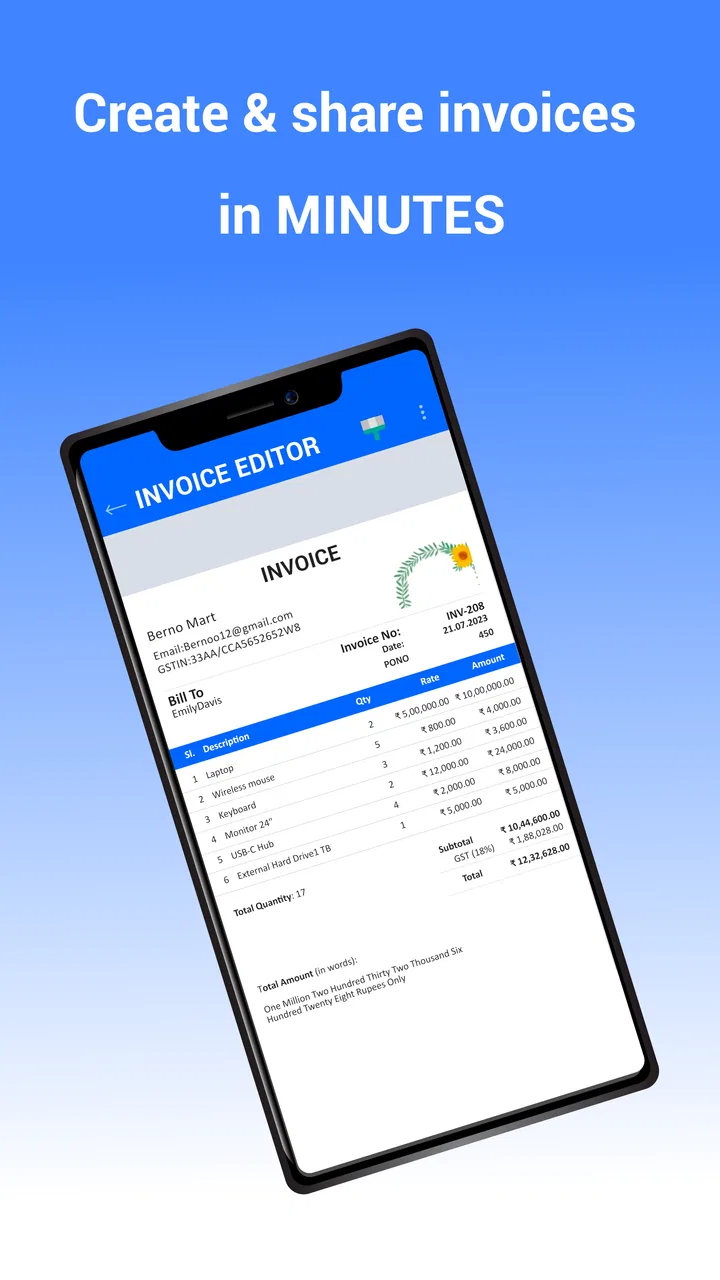
InvoiceTemple: Invoice billing is designed to help freelancers, independent professionals, and small businesses create and manage invoices from a mobile device. You can typically enter customer details, add products or services, apply taxes or discounts, and generate professional-looking invoices. It is especially useful for users who need a simple way to prepare billing documents while working away from a desktop computer.
02Can I customize invoices created with InvoiceTemple?
The app provides customization options intended to make invoices match your business identity and billing requirements. Depending on the available version and settings, you may be able to add your company name, logo, contact information, payment terms, notes, tax details, and preferred currency. Before downloading, check whether the features you need—such as advanced templates, branding, or unlimited invoice creation—are included for free or require a subscription.
03Can InvoiceTemple send or share invoices with customers?
InvoiceTemple is built around creating invoices that can be shared with clients through common mobile options. After preparing an invoice, users may be able to export it as a document or PDF and send it by email, messaging apps, or other supported sharing services. The exact sharing methods can depend on your device, operating system, app permissions, and the plan you use.
04Does InvoiceTemple support payment tracking and business records?
The app may help users keep track of invoices and their payment status, making it easier to distinguish outstanding, paid, or overdue bills. However, an invoicing tool should not automatically be treated as a complete accounting system. If you require bank reconciliation, expense management, detailed tax reports, inventory, or integration with accounting platforms, review the current feature list carefully before relying on InvoiceTemple for your entire business workflow.
05Is InvoiceTemple free to download, and are there in-app purchases?
InvoiceTemple may be available to download at no initial cost, but some functions can be limited by a free plan, advertisements, usage restrictions, or premium subscriptions. Features such as unlimited invoices, extra templates, advanced customization, cloud backup, or removal of advertising may require payment. Check the app-store listing for the latest pricing, trial terms, renewal conditions, and cancellation instructions before subscribing.
Pros
- Quickly creates professional invoices from a phone or tablet.
- Useful templates help maintain a consistent business image.
- Supports tracking invoice status and outstanding payments.
- Convenient for freelancers and small businesses on the go.
- Can reduce manual calculation and formatting errors.
Cons
- Advanced accounting features may be limited compared with full business suites.
- Some useful tools may require a paid subscription or upgrade.
- Invoice customization options may not satisfy complex branding needs.
- Managing many clients and invoices can feel less efficient on mobile.
- Users should verify tax settings and currency details before sending invoices.

InvoiceTemple: Invoice billing
Gallery